Downloads
Tagged 'Textures'
Marathon Simply Textured 1 1
Meerjel01 on 05/29/2026
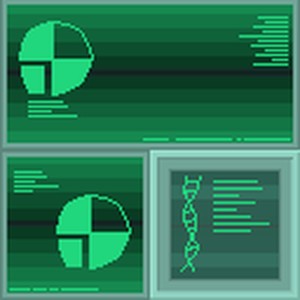
These are the old textures from Feral and Frolic which was praised for their minimalism. I had never seen the reviews on those 2 scenarios until recently and decided that I should do some usable assets for scenario making.
These were taken from the shapes files with ShapeFusion and can be added into another. Replace one of the existing wall sections.
It is free to use these textures but credit me please.
Notes for version 1:
Initialized
80 downloads, 0 reviews, 2 screenshots
Community/Freeverse Plugin - Scenery 2.6
herecomethej2000 on 12/03/2025

CFP is a complete set of high definition textures for Marathon Infinity and Durandal. Based on the original Freeverse Marathon 2 Durandal XBLA textures, these have been further enhanced by the Alephone community with glowmaps and made to support Marathon Infinity.
IMPORTANT: These scenery textures are not compatible with the Transparent_Liquids plugin as that is for the default textures. Make sure that that plugin is disabled or it will interfere with the freeverse splash and puddle textures.
Contributors:
Freeverse, Hopper, Treellama, TheDoc45, General Tacticus, J2k, Spurious Interrupt, Tfear7
This is the scenery portion of the plugin.
Other CFP Packages
CFP Monsters - http://simplici7y.com/items/community-freeverse-plugin-monsters
CFP Weapons Inf - http://simplici7y.com/items/community-freeverse-plugin-weapons
CFP Weapons M2 - http://simplici7y.com/items/community-freeverse-plugin-weapons-m2
CFP Walls M2 - http://simplici7y.com/items/community-freeverse-plugin-walls-m2
CFP Walls MInf - https://simplici7y.com/items/communityfreeverse-walls-minf/
Masters of textures for CFP can be found here: https://github.com/JoshuaPettus/Marathon-Community-Freeverse-Textures.git
Notes for version 2.6:
- Cleaned up more bone scenery items
7,883 downloads, 0 reviews, 3 screenshots
Community/Freeverse Plugin - Monsters 2.16
herecomethej2000 on 11/23/2025

CFP is a complete set of high definition textures for Marathon Infinity and Durandal. Based on the original Freeverse Marathon 2 Durandal XBLA textures, these have been further enhanced by the Alephone community with glowmaps and made to support Marathon Infinity.
Contributors:
Freeverse, Hopper, Treellama, TheDoc45, General Tacticus, J2k, Spurious Interrupt, Tfear7
This is the monsters portion of the plugin.
Installation: The downloaded file must be decompressed before moving to the plugin folder or the load time on every level will be about 5 minutes.
Other CFP Packages:
CFP Scenery - http://simplici7y.com/items/community-freeverse-plugin-scenery
CFP Weapons Inf - http://simplici7y.com/items/community-freeverse-plugin-weapons
CFP Weapons M2 - http://simplici7y.com/items/community-freeverse-plugin-weapons-m2
CFP Walls M2 - http://simplici7y.com/items/community-freeverse-plugin-walls-m2
CFP Walls MInf - https://simplici7y.com/items/communityfreeverse-walls-minf/
Masters of textures for CFP can be found here: https://github.com/JoshuaPettus/Marathon-Community-Freeverse-Textures.git
Notes for version 2.16:
- Redid alien blood splatter
- Redid F'lickta blood splatter
- Cleaned up Juggernaut and Drone wreckage
9,327 downloads, 1 review, 5 screenshots, 5.0 rating
Community/Freeverse Plugin - Weapons M2 2.4
herecomethej2000 on 08/31/2025
CFP is a complete set of high definition textures for Marathon Infinity and Durandal. Based on the original Freeverse Marathon 2 Durandal XBLA textures, these have been further enhanced by the Alephone community with glowmaps and made to support Marathon Infinity.
Note: If load times are too slow, try uncompromising the plugin in the plugin folder.
Contributors:
Freeverse, Hopper, Treellama, TheDoc45, General Tacticus, J2k, Spurious Interrupt, Tfear7
This is the weapons/items portion of the plugin and can only be used for Marathon 2 Durandal. A Marathon Infinity version is available.
Other CFP Packages
CFP Walls MInf - https://simplici7y.com/items/communityfreeverse-walls-minf/
CFP Walls M2 - http://simplici7y.com/items/community-freeverse-plugin-walls-m2
CFP Monsters - http://simplici7y.com/items/community-freeverse-plugin-monsters
CFP Scenery - http://simplici7y.com/items/community-freeverse-plugin-scenery
CFP Weapons Inf - http://simplici7y.com/items/community-freeverse-plugin-weapons
Masters of textures for CFP can be found here: https://github.com/JoshuaPettus/Marathon-Community-Freeverse-Textures.git
Notes for version 2.4:
- Even more edge cleaning of weapons and items
7,005 downloads, 0 reviews, 0 screenshots
Community/Freeverse Plugin - Weapons Minf 2.5
herecomethej2000 on 08/31/2025

CFP is a complete set of high definition textures for Marathon Infinity and Durandal. Based on the original Freeverse Marathon 2 Durandal XBLA textures, these have been further enhanced by the Alephone community with glowmaps and made to support Marathon Infinity.
Contributors:
Freeverse, Hopper, Treellama, TheDoc45, General Tacticus, J2k, Spurious Interrupt, Tfear7
This is the weapons/items portion of the plugin and can only be used for Marathon Infinity. A Marathon 2 version is available.
Other CFP Packages
CFP Monsters - http://simplici7y.com/items/community-freeverse-plugin-monsters
CFP Scenery - http://simplici7y.com/items/community-freeverse-plugin-scenery
CFP Weapons M2 - http://simplici7y.com/items/community-freeverse-plugin-weapons-m2
CFP Walls M2 - http://simplici7y.com/items/community-freeverse-plugin-walls-m2
CFP Walls MInf - https://simplici7y.com/items/communityfreeverse-walls-minf/
Masters of textures for CFP can be found here: https://github.com/JoshuaPettus/Marathon-Community-Freeverse-Textures.git
Notes for version 2.5:
- Even more cleaning of weapons and item edges
7,119 downloads, 1 review, 2 screenshots, 2.0 rating
Marathon Texture Renewal Project: Weapons Module 0.5
Rock on 08/02/2024

This is a Collection of Texture upscales for Marathon, all textures have been upscaled by a factor of 4 with the intention to keep as much detail as possible.
This is a little weekend project that ended up taking a few more days than planned, please be aware that some textures still need some work but in general im happy with the current quality of most textures.
Enjoy!
Notes for version 0.5:
Initial release
2,184 downloads, 0 reviews, 4 screenshots
Marathon Texture Renewal Project: Surfaces Module 0.5
Rock on 08/02/2024

This is a Collection of Texture upscales for Marathon, all textures have been upscaled by a factor of 4 with the intention to keep as much detail as possible.
This is a little weekend project that ended up taking a few more days than planned, please be aware that some textures still need some work but in general im happy with the current quality of most textures.
Enjoy!
Notes for version 0.5:
Initial release
2,152 downloads, 0 reviews, 3 screenshots
I (Aaron / The Man) have repackaged Goran Svensson’s Marathon Infinity textures, which were released as five separate plugins, as a single plugin, mostly for the sake of reducing clutter and clicking in our Infinity plugin menus (i.e., if you want to enable one of these, you’ll probably want to enable them all).
In my book, these are by far the best Marathon Infinity texture replacements available (unless you’re using MaraToon; then you should use MaraToon for everything), and they’re certainly the most faithful.
I used Goran’s most recent releases of the Water, Lava, Jjaro, and Pfhor sets; I used kaosof’s edit of the Sewage set with added bump maps. See the included readme for additional information; each set also includes its original documentation within its respective folder.
Screenshots coming when I feel like it.
Enjoy!
Notes for version 1.0:
First release.
2,676 downloads, 1 review, 0 screenshots, 5.0 rating
Konoko Textures 1.0
W'rkncacnter on 07/28/2023
Pretty self explanatory.
1,764 downloads, 2 reviews, 0 screenshots, 4.5 rating
M2 AI Textures 1.0
W'rkncacnter on 04/01/2023

Marathon 2 replacement textures based on the originals, created with AI.
There's no reason for this to exist. I just wanted an excuse to screw around with some new technology.
1,971 downloads, 0 reviews, 4 screenshots

Gigapixel AI upscaled graphics for Marathon 1, 2, and Infinity.
3,065 downloads, 2 reviews, 15 screenshots, 3.5 rating
HD AOPID Graphics 1.1
W'rkncacnter on 02/05/2022

HD graphics replacements for Aleph One: Pathways Into Darkness
AOPID can be found here: http://simplici7y.com/items/aleph-one-pathways-into-darkness
Notes for version 1.1:
Significantly improved weapons in hand and monsters using an updated model and better processing.
3,138 downloads, 1 review, 7 screenshots, 3.0 rating
ML Super Res Walls Infinity Plugin 1.0
treellama on 11/28/2020

Marathon Infinity wall textures upscaled with Pixelmator Pro's ML Super Resolution AI upscaler.
Upscale factor is 3x which is perfect for 1080p.
2,605 downloads, 0 reviews, 3 screenshots
Yuge Definition Textures 1.1
W'rkncacnter on 10/15/2020

The bigliest scenario available now has the bigliest textures imaginable to go with it! If you've ever wanted to experience Mararthon: Yuge with mindblowing 128x128 HD textures, this is your lucky day.
Just when you thought Yuge couldn't look any better, it's now possible to turn on bloom and see limitless glowing peppers, douches, failstaches and more. The choice is yours!
This unbelievable package contains 2 different plugins with varying amounts of bloom, and many different texture masks to put you in control of your Yuge experience. Thanks to Aaron for providing even more masks than before!
These plugins even work with Marathon Infinity, if you ever feel like replaying it with superior textures.
Notes for version 1.1:
Aaron has made bump maps for the existing masks, and added a bunch of new masks.
2,946 downloads, 1 review, 7 screenshots, 4.0 rating
Bump Maps - Sewage 1.0
kaosof on 09/02/2020

This is a set of bump maps (with textures) accompanying Goran's Sewage set.
Glow maps are included.
2,507 downloads, 0 reviews, 1 screenshot
Pfhor Textures Remix 2.0
President People on 08/05/2012
This plugin replaces all Pfhor textures with a combination of the Marathon 2 and Infinity versions into single textures. The result maintains Marathon 2's bright colors, and adds many details from the Infinity textures.
The plugin will work with either Marathon 2 or Marathon Infinity Shapes (or any scenario that leaves the Pfhor texture set unmodified).
Questions, comments, bugs? Post on the Pfhorums.
http://www.pfhorums.com/index.php?showtopic=10009
Notes for version 2.0:
Version 1.0: Initial Release
Version 2.0: Plugin expanded to replace the entire Pfhor texture set, various improvements throughout the pre-existing textures.
3,858 downloads, 2 reviews, 0 screenshots, 4.5 rating
Gorans Animated Liquids 0.2
goran svensson on 02/26/2012
Animates the water with a 24 frame animation.
Only for water set so far. It needs to be activated last, since the last activated plugin gets priority.
Notes for version 0.2:
0.2 Moved the animated water from my water set to this plugin.
4,630 downloads, 2 reviews, 0 screenshots, 4.5 rating
Gorans Water Set 2.2
goran svensson on 02/26/2012
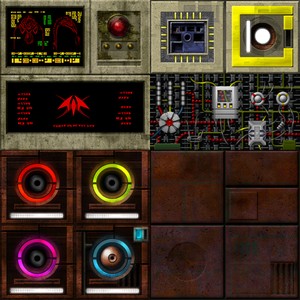
This plugin replaces all the textures in marathon infinity's water set with 512x512 versions. I have sought to stay true to the originals and I hope it shows. Version 2 includes major updates to all textures. Bump maps are now supported. Make sure to check that out!
Notes for version 2.2:
2.0 Updates to all textures and new bump maps.
2.01 Fixed missing light on switch
2.1 Added animated water. Replaced bitmap 07 with png to fix color issue.
2.2 Updated Read Me. Moved animated water to a separate plugin.
4,499 downloads, 0 reviews, 1 screenshot
XBLA Textures Plugin 20120128
treellama on 02/10/2012

This plugin contains the HD textures and landscapes that come with the Xbox Live Arcade game Marathon: Durandal, created by Freeverse. It is also included in the all-in-one download of Marathon 2.
3,961 downloads, 0 reviews, 1 screenshot
M2 Preview Textures Plugin 2.2
President People on 01/19/2012

This plugin replaces some textures with those found in the Marathon 2 Preview.
The Marathon 2 Preview was released before the Marathon 2 Demo, and contains different textures, weapons and sprites than in the full game, and in some cases, the demo.
I highly recommend that you use Marathon 2 Textures with this plugin. Aleph One 1.0 also recommended.
-- Special Thanks to Hopper for converting the M2 Preview Shapes to Aleph One Format
For more info on the M2 Preview, check out the Marathon Story Page:
http://marathon.bungie.org/story/
Check out Hopper's converted M2 Preview Shapes on the Pfhorums:
http://www.pfhorums.com/index.php?showtopic=12942&pid=99607&st=0&#entry99607
Any questions or comments? You can contact me on the Pfhorums.
http://www.pfhorums.com/
Notes for version 2.2:
v2.1 to 2.2
- Ugh, texture 010 was incorrectly named after the Preview, in which it was bitmap 23. Corrected.
v2.0 to 2.1
- I'd forgotten to convert the new textures to DDS format. They should work properly now.
v1.0 to v2.0 - Completely replaced all bitmaps, using Hopper's converted M2 Preview Shapes (The screenshot method was worth it :))
- Added textures 002, 003, 027, and 029
